You can apply your own custom CSS code on Charles theme. Your custom CSS code will not be lost even if you update the theme.nnNavigate to Appearance > Customize > Additional CSSnnTake a look at the screenshots-nn nn
nn
Category: Uncategorized
-
How to apply custom CSS code.
-
How to change Author Avatar?
The theme uses Gravatar to display users avatars . to create or change your Gravatar :n
If you have never setup a Gravatar account:
n
- n
- Register/login to Gravatar. Upon registering, use the SAME email address that is associated with your WordPress User Profile.
- Upload your photo and associate it with that specific email address.
n
n
n n
If you already registered at gravatar.com, follow these steps:
n
- n
- Click on “My Gravatars”.
- click on “Add a New Email”.
- Then, you’ll need to click on “Add a New Image”.
- Upload an image.
- Then select the email address, and then select your image from the bottom. Now it’s associated with that email address. Click Save.
- It will take about 5-10 minutes to propagate on the internet, and then will appear on site.
n
n
n
n
n
n
-
How to Paginate a Post ?
In order to paginate your blog post, in the Write panel in your WordPress admin, switch to the TEXT view (if you are using the Visual view) and then enter the following code to wherever you want to break the post up into a new page:n
<!--nextpage-->
n

-
Menu Not Appearing
Please make sure you have generated and set menus on “Appearance > Menus”.nn”Main Menu” menu locations have to be filled to make the menus work as expected.
-
How to set site’s favicon
Go to Appearance > Customize > Site Identity. Then Select an image as site icon. It’s recommended to use a .ico image as the site icon (favicon).nn
 nn
nn -
Updating Your Theme
We are strongly recommended to install “Envato Toolkit” plugin for ease of use. Once necessary plugin installed and activated “Envato Toolkit” menu will be available at your admin side.nnImportant : If you have missing plugins or having issues to install any of them, all the related could be found under “recommended-plugins” folder within the downloaded package.n
User Account Information
nTo obtain your API Key, visit your “My Settings” page on any of the Envato Marketplaces. Once a valid connection has been made any changes to the API key below for this username will not effect the results for 5 minutes because they’re cached in the database. If you have already made an API connection and just purchase a theme and it’s not showing up, wait five minutes and refresh the page. If the theme is still not showing up, it’s possible the author has not made it available for auto install yet.nnMarketplace Username: Enter your Envato marketplace username.nnSecret API Key: Enter your Envato marketplace Secret API Key (http://themeforest.net/user/[your-username]/api_keys/edit, Login to your Themeforest account, Settings > API Key)n
Backup Information
nThis plugin will automatically save your theme as a ZIP archive before it does an upgrade. The directory those backups get saved to is wp-content/envato-backups. However, if you’re experiencing problems while attempting to upgrade, it’s likely to be a permissions issue and you may want to manually backup your theme before upgrading. Alternatively, if you don’t want to backup your theme you can check the box below.nnSkip Theme Backup: Strongly recommended keep unchecked.n
Alternative Way
nYou can also update the theme by replacing the old theme folder. First go to your theme directory then delete the theme folder and paste the new version of the theme.
-
How to (FAQs)
nHarum proident? Volutpat sint. Dicta. Eleifend, distinctio placeat nec commodo asperiores posuere fusce illo, adipiscing leo velit ipsum. Mauris enim itaque penatibus, consectetur fermentum, vel temporibus interdum
n -
System Requirements
To use Charles you need to have a WordPress 4.0 (or higher version) site with PHP 5.4 or more running on your hosting server. If you’ve already installed WordPress on your server and your site is up, that’s great. For help regarding WordPress installation, please see this WordPress Codex link.nnSome more resources from WordPress Codex:n
-
Required Plugins
After installing the theme you most have to install the ‘Charles Core’, ‘Elementor’ and ‘Piklist’ plugins to import the demo content as well and work the theme correctly.nnYou will find all required and recommended plugins at Appearance > Install Plugins.
-
Demo Import
If you want your site to look like exactly the ‘Charles’ demos then you have to import the demo content successfully.nnWe integrated the One Click Demo installation feature to ‘Charles’ WordPress theme. You can import all demo content just by a click only.n
OneClick Demo Installation Process
n
- n
- Install the theme and active it. Then install all required plugins. Make sure all the required plugins are activated.
- After activating all the required plugins navigate to Appearance > ‘One Click Demo Import’ menu from the WordPress dashboard.
n
n
n
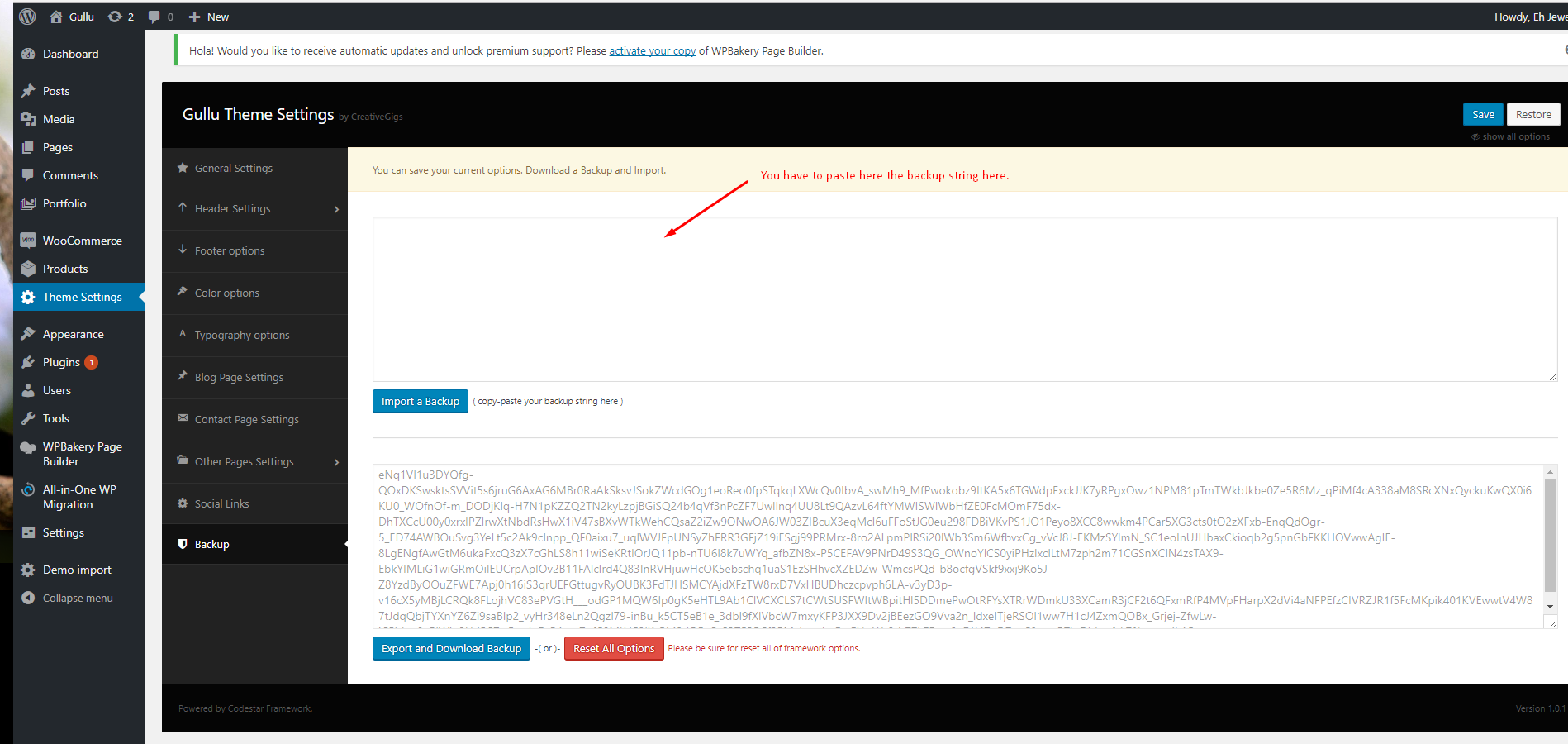
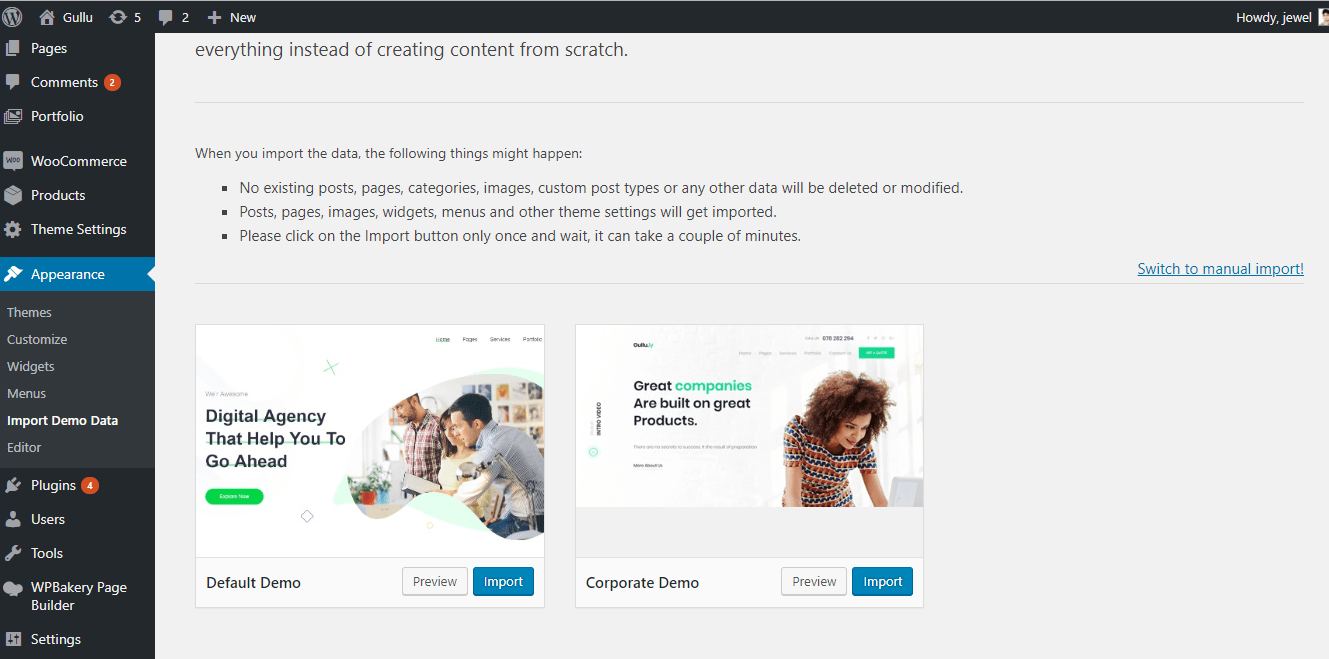 nnNote: If the option data do not import then you have to import it manually. Navigate to ‘Theme Settings > Backup’. Then copy-paste the backup string here and click on the Import a Backup button. You will find the backup string in the options.txt file.nn
 n
nThe recommended method to import the demo content.
nIf you failed to import the demo content by one click then you have to follow the below steps to import the demo content manually. You will get all demo content data with the theme package. You will find the demos in ‘charles>inc/demo{disired-demo-number} this path.n
- n
- Navigate to Tools > Import then install the WordPress plugin and click on the ‘Run Importer’. Upload here the ‘theme_content.xml’ file.
- Install the ‘Widget Importer & Exporter‘ plugin to import the demo widgets. Then navigate to Tools > Widget Importer & Exporter and upload here the ‘widget_data.wie’ file.
- Now you have to import the Dental Options as like the demo. Navigate to ‘Theme Settings > Backup’. Then copy-paste the backup string here and click on the Import a Backup button. You will find the backup string in the options.txt file.
n
n
n